

Cryptocurrency has become much bigger than just buying Bitcoin and hoping it goes “to the moon.” In 2026, many people own different digital assets, use multiple exchanges, trade NFTs, stake coins, and even earn rewards from decentralized finance (DeFi) platforms. The problem? Keeping track of everything can quickly become a giant headache.
Imagine opening five crypto apps and trying to remember where you bought that tiny amount of Ethereum two years ago. Sounds fun? Probably not.
This is where CoinTracker enters the picture.
In this beginner-friendly guide, we will explore what CoinTracker is, how it works, its features, benefits, pricing, and whether it is worth using in 2026.
What Is CoinTracker?
CoinTracker is a cryptocurrency portfolio tracking and tax reporting platform that helps users monitor their digital assets and calculate crypto taxes automatically.
Simply put, it acts like a personal accountant for your crypto investments.
Instead of manually writing down every Bitcoin purchase or Ethereum trade in spreadsheets that look like rocket science, CoinTracker connects with your exchanges and wallets to organize everything in one place.
Think of it as:
Google Maps for your crypto portfolio.
It helps you know:
- What coins you own
- How much profit or loss you made
- Where your assets are stored
- What taxes you may owe
For many crypto investors, this can save hours of work and possibly prevent some serious tax-related stress.
Why Was CoinTracker Created?
As cryptocurrency became more popular, investors started using multiple exchanges such as:
- Coinbase
- Binance
- Kraken
- MetaMask
- Hardware wallets
Keeping records manually became extremely difficult.
Imagine buying:
- Bitcoin in January
- Ethereum in March
- Meme coins in June
- Forgetting passwords in August
- Panicking during tax season in April
This is the typical crypto investor journey.
CoinTracker was created to simplify this chaos by automatically gathering transaction information from various platforms.
How Does CoinTracker Work?
CoinTracker works by connecting your wallets and exchanges through APIs or wallet addresses.
Once connected, the platform automatically imports your transactions and calculates important information.
The Process Is Quite Simple
| Step | What Happens |
|---|---|
| 1 | Create a CoinTracker account |
| 2 | Connect exchanges and wallets |
| 3 | Import transaction history |
| 4 | Track portfolio performance |
| 5 | Generate tax reports |
The platform keeps updating your balances automatically, which means you don’t have to spend every weekend updating spreadsheets.
Your coffee deserves more attention than spreadsheets.
Main Features of CoinTracker
1. Portfolio Tracking
This is one of the biggest reasons people use CoinTracker.
The platform shows:
- Total portfolio value
- Daily profit and loss
- Historical performance
- Individual asset performance
You can easily see whether your investment genius is real or if your meme coin purchases need some serious reconsideration.
2. Automatic Transaction Import
CoinTracker supports numerous exchanges and wallets.
Instead of entering transactions manually, users can sync their accounts and let the software do the heavy lifting.
This feature is especially useful if you have hundreds or even thousands of transactions.
Because honestly, nobody wants to manually enter transaction number 872.
3. Crypto Tax Reporting
Taxes and crypto are not exactly best friends.
CoinTracker helps users calculate:
- Capital gains
- Capital losses
- Income from staking
- Mining rewards
- Airdrops
- NFT transactions
Tax season becomes much easier because the software organizes everything into reports.
You may still dislike taxes, but at least you won’t have to wrestle with endless calculations.
4. Multi-Wallet Support
Many investors use several wallets:
- Hardware wallets
- Mobile wallets
- Exchange wallets
- DeFi wallets
CoinTracker brings everything together into one dashboard.
It’s like having one remote control instead of five different remotes scattered around your house.
5. Real-Time Portfolio Updates
Crypto prices change every second.
One minute you feel rich.
Five minutes later, you’re wondering if instant noodles should become your main food source.
CoinTracker updates your portfolio values in real time so you can monitor market movements.
Benefits of Using CoinTracker
There are several advantages to using the platform.
Saves Time
Manual tracking takes hours.
Automation can save significant time, especially for active traders.
Reduces Errors
Human mistakes happen frequently.
Typing one wrong number can completely change your tax calculations.
Automation helps minimize these issues.
Better Financial Planning
When you can clearly see your profits and losses, making investment decisions becomes easier.
Simplifies Tax Preparation
One of the biggest benefits is making tax season less stressful.
Nobody enjoys searching through thousands of old transactions.
Who Should Use CoinTracker?
CoinTracker can be useful for different types of crypto users.
| User Type | Is CoinTracker Useful? |
|---|---|
| Beginners | Yes |
| Long-Term Investors | Yes |
| Active Traders | Very Useful |
| NFT Collectors | Useful |
| DeFi Users | Extremely Useful |
| Casual Users | Helpful |
Even if you only own a small amount of crypto, tracking tools can still provide valuable insights.
CoinTracker Pricing in 2026
Pricing may change over time, but CoinTracker generally offers multiple plans.
Free Plan
Usually suitable for beginners who have limited transactions.
Features often include:
- Portfolio tracking
- Limited transaction support
- Basic reporting
Paid Plans
Paid plans generally provide:
- More transaction limits
- Advanced tax reports
- Priority support
- Additional analytics tools
For active traders, paid plans may save enough time to justify the cost.
Because time is money… especially in crypto.
Supported Cryptocurrencies and Platforms
CoinTracker supports a large number of cryptocurrencies and exchanges.
Examples include:
Popular Coins
- Bitcoin (BTC)
- Ethereum (ETH)
- Solana (SOL)
- XRP
- Cardano (ADA)
- Dogecoin (DOGE)
Popular Exchanges
- Coinbase
- Binance
- Kraken
- Gemini
- KuCoin
Wallet Support
- MetaMask
- Ledger
- Trust Wallet
- Phantom
- Trezor
This broad support is one reason why many users choose CoinTracker.
CoinTracker Pros and Cons
Pros
Advantages
- Easy for beginners
- Automatic synchronization
- Portfolio tracking
- Tax reporting tools
- Supports many exchanges
- Saves considerable time
Cons
Disadvantages
- Some advanced features require paid plans
- Certain complex DeFi transactions may occasionally need manual review
- Pricing can become expensive for heavy traders with huge transaction histories
No platform is perfect, but CoinTracker offers a solid balance between simplicity and functionality.
CoinTracker vs Manual Tracking
| Feature | CoinTracker | Manual Spreadsheet |
|---|---|---|
| Easy Setup | ✅ | ❌ |
| Automatic Updates | ✅ | ❌ |
| Tax Reports | ✅ | ❌ |
| Error Reduction | ✅ | ❌ |
| Time Required | Low | Very High |
Spreadsheets still work, but they can become difficult to manage once your crypto activity increases.
Many investors start with spreadsheets and later realize they accidentally created a full-time job.
Is CoinTracker Safe?
Security is one of the biggest concerns in cryptocurrency.
CoinTracker generally uses secure methods to connect accounts.
Importantly, portfolio tracking connections often use read-only access, meaning the platform can view transaction data but cannot directly trade or withdraw your funds.
Still, users should always:
- Enable two-factor authentication (2FA)
- Use strong passwords
- Avoid sharing account information
- Regularly review connected accounts
Good security habits are always important in the crypto world.
Tips for Beginners Using CoinTracker
1. Connect Accounts Early
Do not wait until tax season.
Your future self will thank you.
2. Review Imported Transactions
Automation is helpful, but checking your records occasionally is still a good idea.
3. Learn Basic Tax Rules
Understanding basic crypto tax concepts can help avoid surprises later.
4. Keep Backup Records
Export reports periodically for additional safety.
Because technology is wonderful… until something decides to stop working at the worst possible moment.
Common Mistakes Beginners Make
Ignoring Small Transactions
Even tiny transactions can matter for reporting purposes.
Forgetting Old Wallets
Many people forget they own crypto on old exchanges.
Waiting Until Tax Season
This is probably the most common mistake.
Trying to organize years of crypto history in one weekend is not exactly a relaxing experience.
The Future of CoinTracker in 2026 and Beyond
The cryptocurrency industry continues to grow rapidly.
As regulations become more detailed and investors use more platforms, tracking tools will likely become even more important.
Future developments may include:
- Better DeFi integration
- More advanced analytics
- Improved NFT support
- Enhanced tax automation
- Additional AI-powered insights
The crypto ecosystem is becoming more complicated, which means tools like CoinTracker may continue gaining popularity.

Final Thoughts
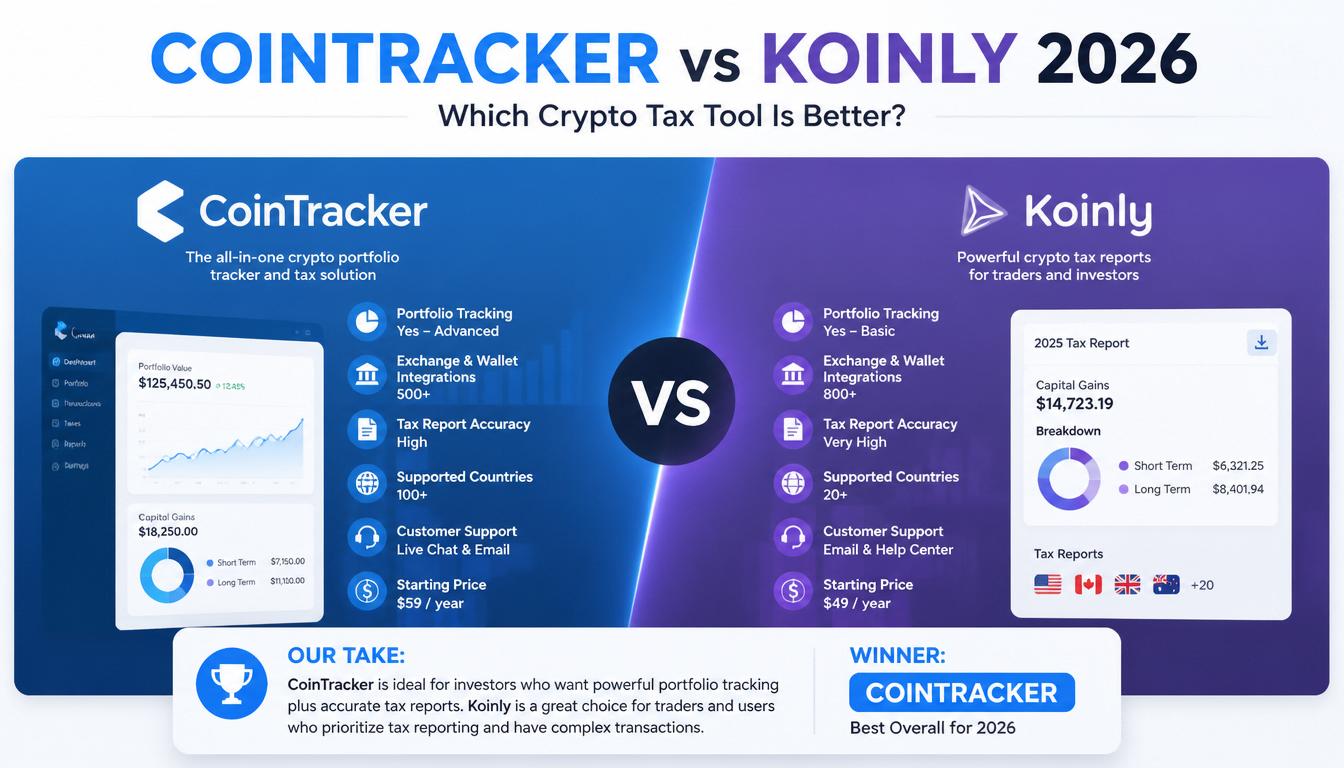
CoinTracker is a useful platform that helps cryptocurrency investors track portfolios, organize transactions, and simplify tax reporting.
For beginners, it removes much of the confusion that comes with managing digital assets across multiple wallets and exchanges. For advanced users, it can save countless hours of manual work.
Crypto investing can already feel like riding a roller coaster designed by someone who drinks too much coffee. Keeping your records organized should not add even more stress.
Whether you own a small amount of Bitcoin or actively trade dozens of cryptocurrencies, CoinTracker can be a valuable tool for staying organized in 2026.







Leave a Reply