

Cryptocurrency has become a normal part of modern investing. Millions of people around the world buy Bitcoin, Ethereum, stablecoins, and other digital assets every year. However, when tax season arrives, many crypto users suddenly remember one important thing: the government does not accept “I forgot about that wallet” as a tax strategy.
Managing crypto taxes can feel confusing because digital assets move quickly. You may buy coins on one exchange, send them to another wallet, swap tokens, earn rewards, or receive crypto payments. Tracking every transaction manually can become a full-time job.
This is where CoinTracker can help. CoinTracker is a popular crypto portfolio tracking and tax reporting platform designed to organize your transactions, calculate gains and losses, and prepare reports that make tax filing easier.
In this guide, we will explain how to use CoinTracker for crypto tax reporting in 2026, how it works, its important features, and simple tips to avoid common mistakes.
What Is CoinTracker and Why Do Crypto Investors Need It?
CoinTracker is a cryptocurrency tracking and tax software platform that connects with crypto exchanges and wallets. Instead of manually entering hundreds or thousands of transactions, CoinTracker automatically imports your crypto activity and organizes everything in one place.
Think of CoinTracker like a personal accountant who never sleeps, never complains, and does not drink your expensive coffee from the office kitchen.
The main purpose of CoinTracker is to help users answer important tax questions:
- How much crypto did I buy?
- When did I sell or trade coins?
- Did I make a profit or loss?
- What is my taxable income from crypto?
- How should I report my crypto activity?
In 2026, with more countries increasing crypto reporting requirements, having accurate records is more important than ever.
Why Crypto Tax Reporting Is Important in 2026
Many beginners think taxes only apply when they convert cryptocurrency into traditional money like dollars. However, in many tax systems, several crypto activities may create taxable events.
Examples include:
| Crypto Activity | Possible Tax Impact |
|---|---|
| Selling Bitcoin for cash | Capital gain or loss |
| Trading Ethereum for another token | May be taxable |
| Receiving crypto payments | Income reporting may apply |
| Staking rewards | Often treated as income |
| Mining rewards | May require reporting |
| NFT sales | Possible taxable event |
The biggest challenge is not always paying taxes. The biggest challenge is knowing what happened with your crypto history.
Many users have transactions spread across:
- Crypto exchanges
- Hardware wallets
- Mobile wallets
- DeFi platforms
- NFT marketplaces
Without proper tracking, tax preparation can become a digital treasure hunt.
How CoinTracker Works: The Basic Process
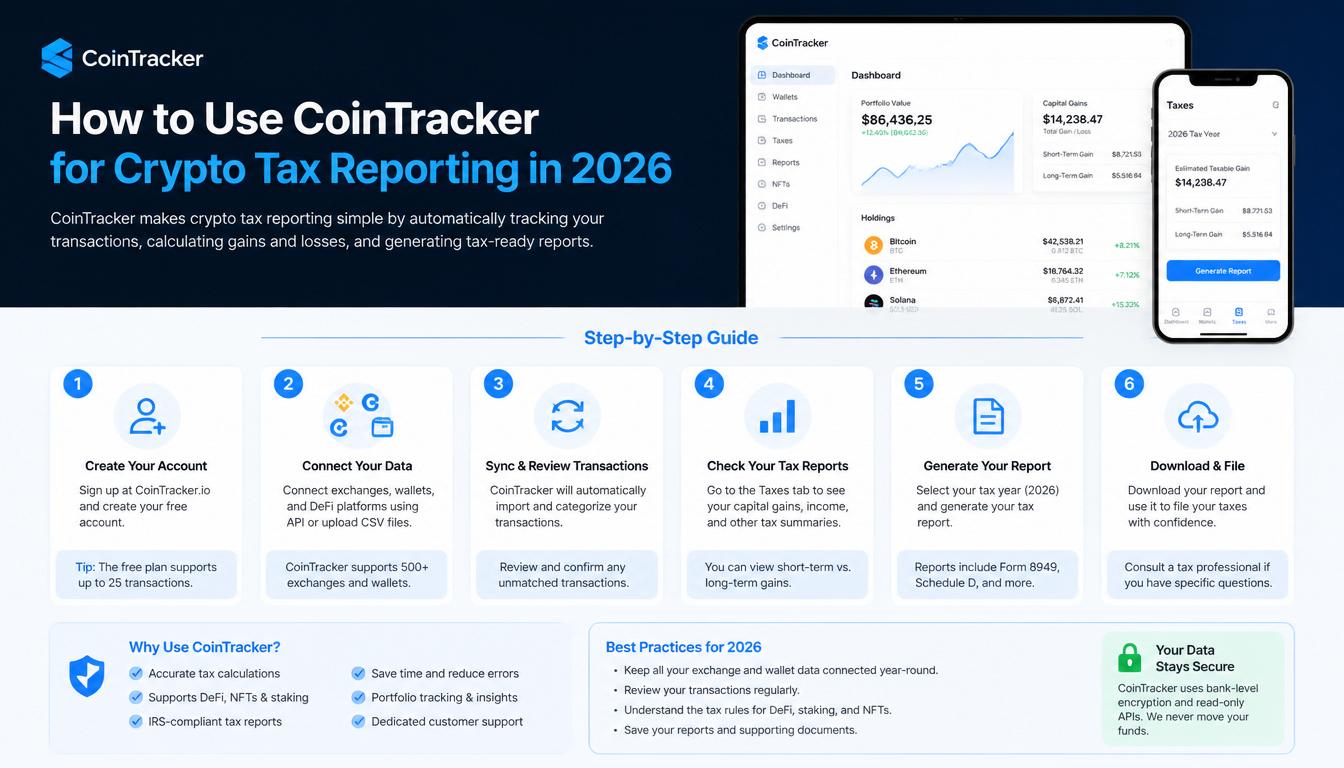
Using CoinTracker is generally simple. The platform follows a few main steps:
- Create an account
- Connect exchanges and wallets
- Import transaction history
- Review your crypto activity
- Generate tax reports
The goal is to turn complicated blockchain activity into organized tax documents.
Step 1: Create Your CoinTracker Account
The first step is creating a CoinTracker account.
After signing up, you will usually provide basic information and choose a plan based on your needs.
CoinTracker may offer different options depending on:
- Number of transactions
- Required tax features
- Portfolio tracking needs
- Professional reporting requirements
For someone with only a few crypto purchases, a basic plan may be enough. Active traders with hundreds of transactions may need more advanced features.
A good rule:
If your crypto history looks like a simple notebook, you probably need basic tools. If it looks like a mystery novel with 500 chapters, you may need a stronger plan.
Step 2: Connect Your Crypto Exchanges
After creating an account, you need to connect the exchanges where you trade cryptocurrency.
Common examples include:
- Centralized exchanges
- Crypto trading platforms
- Brokerage accounts that support digital assets
CoinTracker usually connects through:
- API connections
- CSV file uploads
An API connection allows CoinTracker to automatically read transaction information without giving access to withdraw your funds.
Important safety tip:
Never share your exchange password or private wallet recovery phrase with any tax software.
Your recovery phrase is like the key to your crypto house. Giving it away is like leaving your front door open with a giant welcome sign.
Step 3: Add Your Crypto Wallets
Many crypto users store assets outside exchanges. CoinTracker allows you to connect different wallets.
Examples include:
- Hardware wallets
- Mobile wallets
- Blockchain addresses
You normally provide a public wallet address, allowing CoinTracker to view transaction activity.
Remember:
A public wallet address is like your mailbox address.
A private key or recovery phrase is like your house key.
Never share your house key.
Step 4: Review Imported Transactions
After connecting your accounts, CoinTracker will analyze your crypto history.
The platform organizes transactions such as:
- Purchases
- Sales
- Transfers
- Swaps
- Rewards
- Fees
However, you should always review the information.
Why?
Because blockchain data can sometimes be misunderstood.
For example:
You transfer Bitcoin from one wallet to another.
CoinTracker might recognize it correctly as a transfer, but sometimes manual adjustments may be needed.
Common issues include:
| Problem | Solution |
|---|---|
| Missing transactions | Import additional wallet history |
| Wrong transaction type | Edit transaction details |
| Duplicate records | Remove duplicate entries |
| Incorrect cost basis | Review purchase information |
Understanding CoinTracker Tax Reports
One of the biggest reasons people use CoinTracker is tax reporting.
The platform can help calculate:
- Capital gains
- Capital losses
- Income from crypto activities
- Transaction history
A tax report may include information such as:
| Information | Meaning |
|---|---|
| Purchase price | Amount paid for crypto |
| Sale price | Value when sold |
| Gain/loss | Profit or loss calculation |
| Holding period | How long assets were owned |
| Transaction date | When activity happened |
This information helps users prepare their tax documents.
However, CoinTracker is a tool, not a replacement for professional tax advice.
Tax rules can vary depending on your country and personal situation.
How CoinTracker Helps Different Types of Crypto Users
1. Beginners
New crypto investors often struggle with record keeping.
CoinTracker helps beginners by:
- Automatically organizing transactions
- Showing portfolio performance
- Reducing manual work
Instead of opening ten browser tabs trying to remember where you bought a coin, everything can be viewed in one dashboard.
2. Active Traders
Frequent traders have a bigger challenge because they may complete hundreds of transactions.
CoinTracker can help organize:
- Daily trades
- Token swaps
- Exchange activity
- Trading history
Without tracking software, active trading records can become a giant spreadsheet monster.
And nobody wants to fight a spreadsheet monster during tax season.
3. Long-Term Investors
Even investors who rarely trade need accurate records.
For example:
You bought Bitcoin in 2020 and sold part of it in 2026.
You still need information about:
- Original purchase price
- Purchase date
- Sale value
CoinTracker helps maintain this history.
Advantages of Using CoinTracker in 2026
There are several benefits to using crypto tax software.
1. Saves Time
Manual tracking can take many hours.
CoinTracker automatically organizes information from connected accounts.
2. Reduces Mistakes
Human errors are common.
For example:
- Forgetting an old wallet
- Missing a transaction
- Entering incorrect prices
Automated tools can reduce these problems.
3. Better Organization
Instead of keeping random screenshots and notes, you have a structured record.
4. Portfolio Tracking
CoinTracker is not only for taxes.
Many users also use it to monitor:
- Portfolio value
- Asset distribution
- Investment performance
Common Mistakes Crypto Users Should Avoid
Even with CoinTracker, users should be careful.
Ignoring Old Wallets
Many people forget about wallets they used years ago.
Old transactions may still matter.
Assuming Everything Is Automatic
Software is helpful, but you should review your reports.
Technology makes life easier, but it does not replace checking your work.
Waiting Until Tax Season
The worst time to organize crypto records is the night before filing taxes.
That is when panic mode activates.
Your computer fan starts working harder, your coffee disappears faster, and suddenly every transaction looks suspicious.
Tips for Better Crypto Tax Management in 2026
Follow these simple habits:
- Connect every exchange you use
- Keep wallet records organized
- Review transactions regularly
- Save important documents
- Understand your local tax rules
- Ask a tax professional when needed
A small amount of organization throughout the year can save a huge amount of stress later.
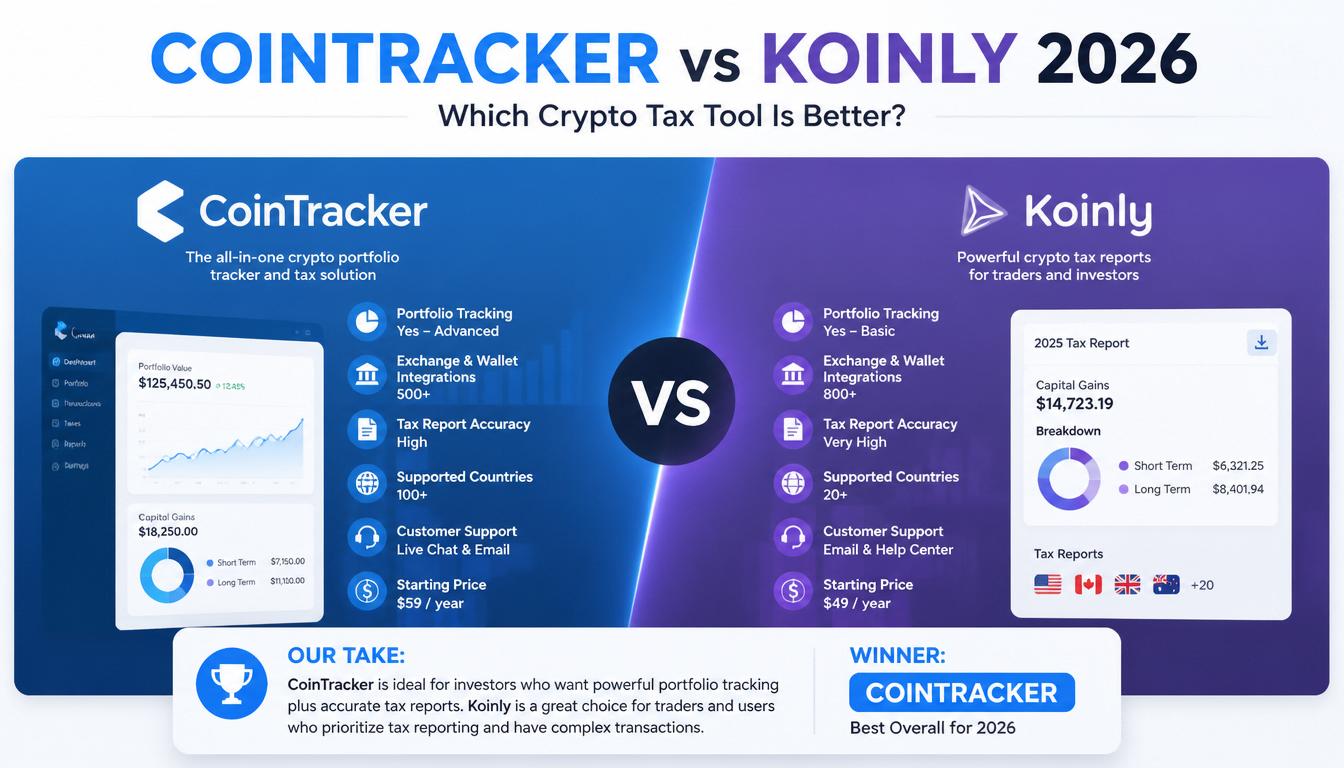
CoinTracker vs Manual Crypto Tax Tracking
| Feature | CoinTracker | Manual Tracking |
|---|---|---|
| Automatic imports | Yes | No |
| Error risk | Lower | Higher |
| Time required | Less | More |
| Portfolio tracking | Available | Requires spreadsheets |
| Beginner friendly | Yes | More difficult |
Manual tracking may work for someone with only a few transactions, but active crypto users usually benefit from specialized software.
Is CoinTracker Worth Using for Crypto Taxes in 2026?
For many crypto investors, CoinTracker can be a useful solution because it simplifies a complicated process.
The biggest advantage is organization. Crypto transactions happen quickly, and keeping accurate records is easier when software helps collect information automatically.
However, users should still review their reports and understand their tax responsibilities.
The best approach is simple:
Use technology to save time, but use your own judgment before submitting tax information.
Final Thoughts: Making Crypto Taxes Less Stressful
Crypto taxes do not have to feel impossible. The key is preparation.
CoinTracker helps turn confusing blockchain activity into organized reports that are easier to understand. Whether you are a beginner buying your first Bitcoin, an active trader, or a long-term investor, keeping accurate records is one of the smartest things you can do.
In 2026, crypto is becoming more connected with traditional finance. That means good record keeping is no longer optional — it is part of being a responsible digital asset owner.







Leave a Reply